Running a NinjaScript Strategy (from a chart)
This guide shows how to run (and stop) a NinjaScript strategy directly from a NinjaTrader 8 chart, plus how to view strategy performance.
Run a strategy from a chart
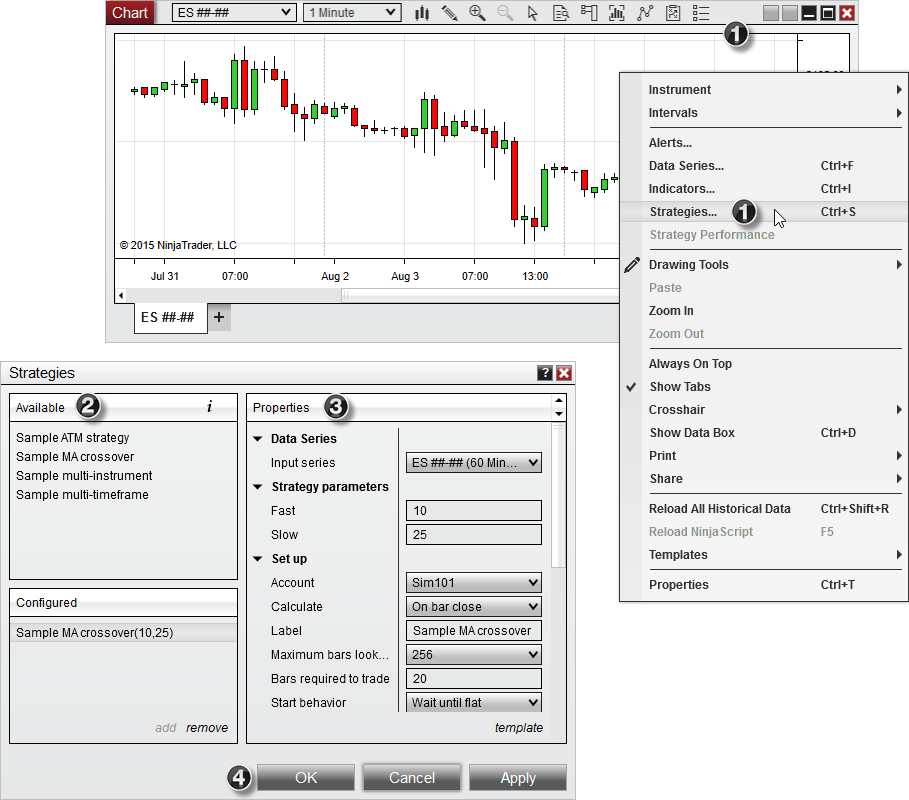
- Open a chart, then open the Strategies window using one of the following:
- Right-click the chart → Strategies
- Click the Strategies icon in the chart toolbar
- Press Ctrl + S (default hotkey)
- In Available, select your strategy and click Add (or double-click the strategy).
- In Configured, adjust any strategy properties as needed.
- Click OK to run the strategy.
Important
- You must set Enabled = True to turn a strategy on. If Enabled is False, the strategy can still be applied to the chart, but it will be inactive.
Tips (from NinjaTrader)
- NinjaTrader must be connected to a live brokerage or market data vendor for a strategy to run. You can also use the Replay or Simulated Data Feed connections.
- Strategy menu options will not appear if you are not connected live.
- When you terminate a strategy, any strategy-generated trade markers or drawing objects will be removed from the chart.
- Orders generated by a strategy are live. Manually canceling strategy-generated orders can cause the strategy to stop executing as expected. If you need to cancel, terminate the strategy itself.
- Clicking Close to close a position on an account/instrument that has a strategy running will disable the strategy.
- Running and disabled strategies are displayed in the Control Center → Strategies tab.
Stop (terminate) or disable a strategy
To terminate a strategy:
- Open the Strategies window.
- In Configured, select the running strategy.
- Click Remove.
Alternatively, set Enabled = False to disable it without removing it (so you can re-enable it later without resetting properties).
Understand strategy properties (overview)
The Strategies window includes a set of adjustable properties that control how the strategy runs.
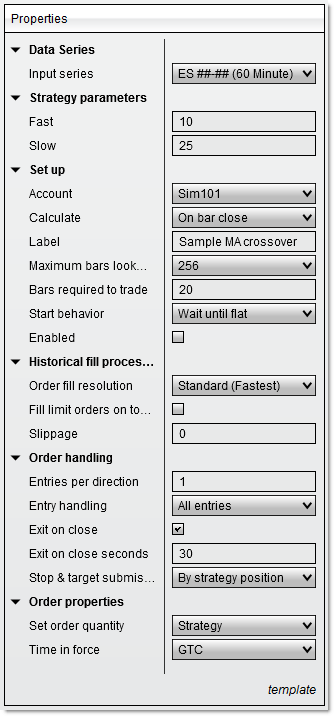
If you’re unsure what a specific property does, use the official NinjaTrader definitions (linked in Source below).
View strategy performance (from the chart)
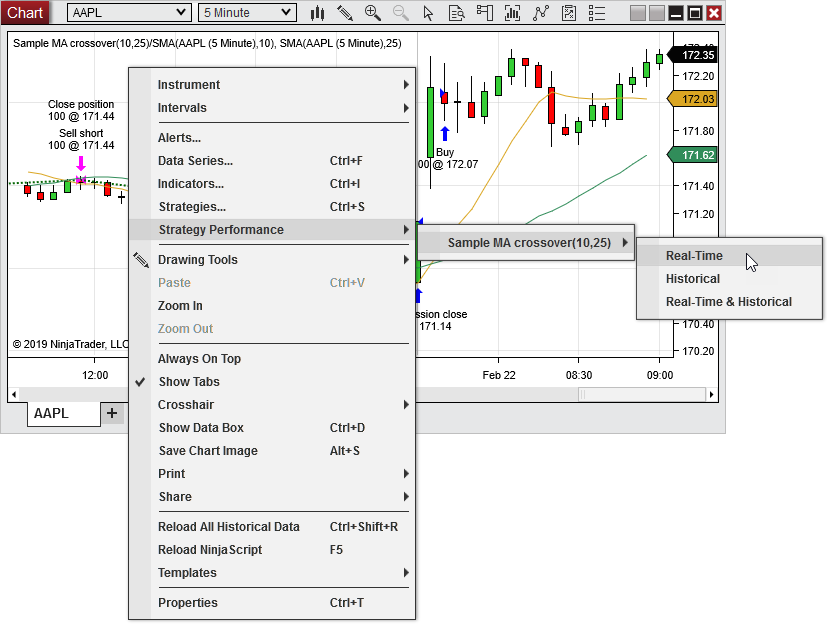
You can view real-time and/or historical performance for a strategy applied to a chart:
- Right-click in the chart.
- Select Strategy Performance.
- Hover your strategy, then choose which executions to view:
- Real-Time
- Historical
- Real-Time and Historical
This opens a performance window where you can analyze strategy trade data.
Source
- Official NinjaTrader guide: Running a NinjaScript Strategy from a Chart (opens in a new tab)